What Is an STL File and Why Is It Essential for 3D Printing?

In the world of additive manufacturing, if the 3D printer is the body and filament is the blood, then the STL file is undoubtedly the brain—the blueprint that makes every creation possible. It's the oldest and most widespread file format, serving as the essential bridge between your digital idea and its physical reality. But what exactly is an STL file, and why is it so fundamental to 3D printing?

Origins and Anatomy of an STL File
The STL format, an acronym for STereoLithography (the technology for which it was developed), was created in 1987 by 3D Systems, one of the pioneering companies in 3D printing. Its longevity and near-universal adoption speak to its simplicity and effectiveness.
At the heart of the STL format lies a simple concept: triangulation. An STL file represents the surface of a three-dimensional object as a series of interconnected triangles (a mesh). The more complex or detailed the object, the more triangles are needed to describe it. Imagine a sphere: to represent it in STL, it's composed of thousands of small flat triangles that, viewed from a distance, create the illusion of a curved surface.
Each triangle is defined by:
- The coordinates of its three vertices (points in space).
- A normal vector (an arrow perpendicular to the triangle's surface) that indicates the triangle's orientation—which side is the "outside" of the object. This information is crucial so that slicing software knows where the inside and outside of the part are.
STL files can exist in two forms:
- ASCII: A human-readable text format, but very large file sizes.
- Binary: A compressed format, much more compact and faster for computers to process, making it the most commonly used format.
The Crucial Role of STL Files in the 3D Printing Workflow
The STL file is the first concrete step in the production chain for a 3D-printed part:
- 3D Modeling: It all starts with creating a 3D model using computer-aided design (CAD) software like SolidWorks, AutoCAD 3D, Fusion, SketchUp, Blender, or Revit.
- STL Export: Once the model is complete, it's exported to STL format. During this export, it's important to choose an appropriate mesh resolution:
- Too low a resolution will result in an object with visible facets (a "polygonal" appearance).
- Too high a resolution will greatly increase file size without noticeable benefit and may even slow down slicing software.
- Import into the Slicer: The STL file is then imported into slicing software like Cura, PrusaSlicer, or Simplify3D. The slicer interprets this triangular mesh.
- G-code Generation: The slicer uses the STL mesh to "slice" the object virtually into thin horizontal layers and generate G-code—the language that the 3D printer understands to deposit material layer by layer.
Advantages and Limitations of the STL Format
Despite its ubiquity, the STL format has its strengths and weaknesses:
Advantages:
- Simplicity and Universality: Its simple structure makes it easy to generate by virtually all CAD software and universally compatible with every 3D printer and slicer.
- Standardization: It has become the de facto standard in the additive manufacturing industry.
- Lightweight (binary format): Binary files are relatively compact, especially for simple geometries, making them easy to share and manipulate.
Limitations:
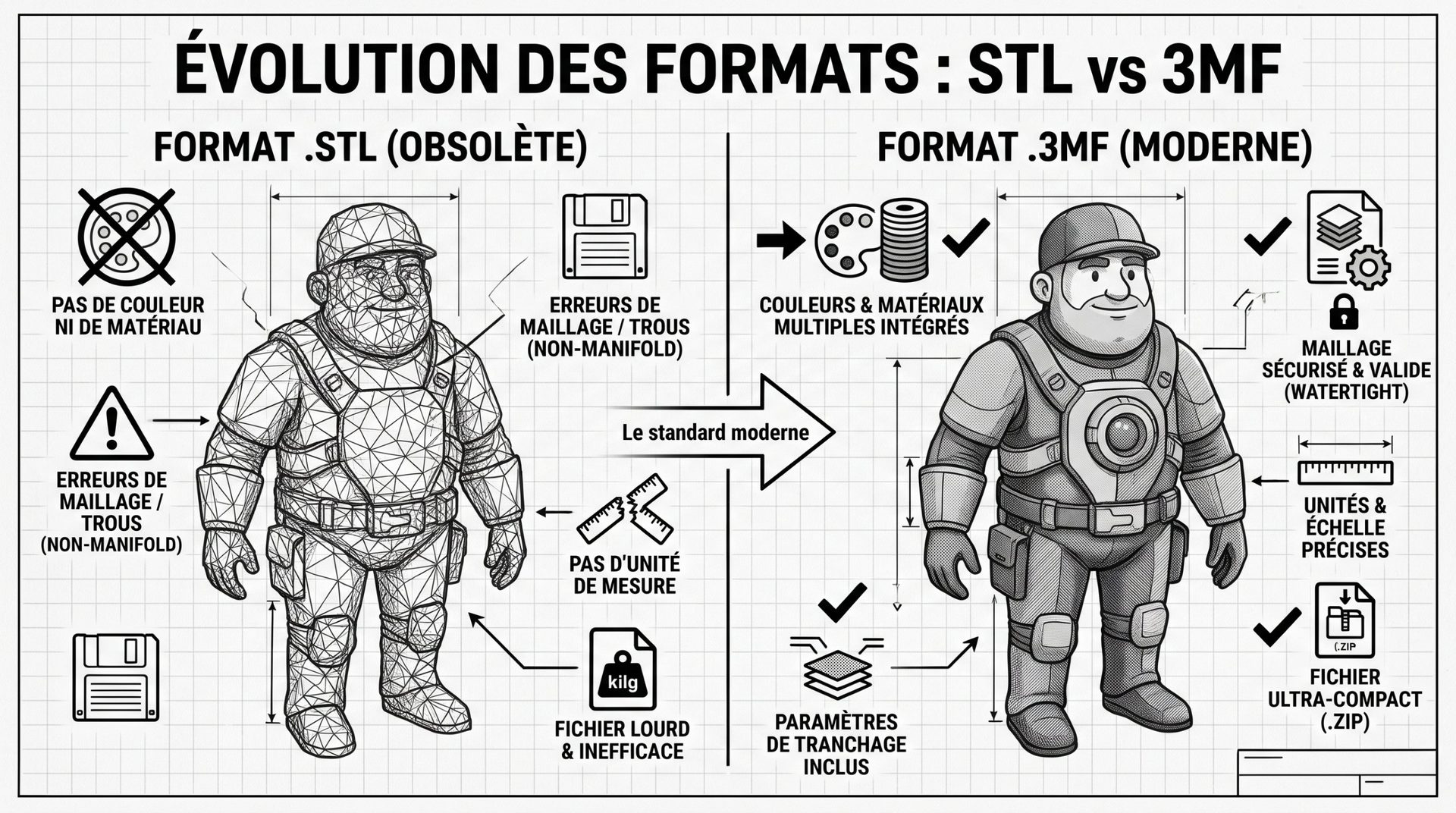
- Lack of information: STL contains no information about color, texture, material, units of measurement (mm, inches), or scale. This information must be defined separately by the user in the slicer.
- Geometric approximation: Curved surfaces are always an approximation of flat triangles. This can lead to a "faceted" effect if mesh resolution is insufficient.
- Mesh problems: A poorly exported or poorly designed STL can have "holes," "inverted normals" (the slicer can't tell inside from outside), self-intersecting surfaces, or non-manifold edges. These errors (often called "bad STL") can cause problems during slicing or printing.
- File size: For extremely complex models with very high resolution (e.g., detailed 3D scans), STL files can become very large.
Alternatives to the STL Format
Facing STL's limitations, new formats have emerged, seeking to offer a more complete solution:
- OBJ: Similar to STL, but can include color and texture information, though still based on triangular meshes.
- 3MF (3D Manufacturing Format): Often presented as the "successor" to STL. It's an XML-based format that can encapsulate far more information in a single file: geometry (mesh), color, texture, multiple materials, material properties, unit information, and even support structures. It aims to simplify and reliabilize data exchange between different software and machines.
- AMF (Additive Manufacturing File Format): Another XML-based format attempt, offering features similar to 3MF, but less widely adopted.
- Native CAD Formats (STEP, IGES): Used in engineering, these formats describe "solid" geometries (with precise mathematical equations) rather than meshes. They are more accurate but often require conversion to STL or 3MF for 3D printing.
The STL file remains, in 2025, the cornerstone of 3D printing. Its simplicity and universality have ensured its dominance for decades. However, as industry needs evolve toward multi-material, multi-color printing and more integrated processes, the gradual adoption of richer formats like 3MF is accelerating.
Understanding what an STL file is and how it works is essential for every 3D printer user, ensuring better model management and optimized prints. It's the starting point of every additive manufacturing adventure, transforming digital ideas into tangible reality.