
eufyMake E1: The UV Printer Bringing Color and Texture to Your 3D Prints
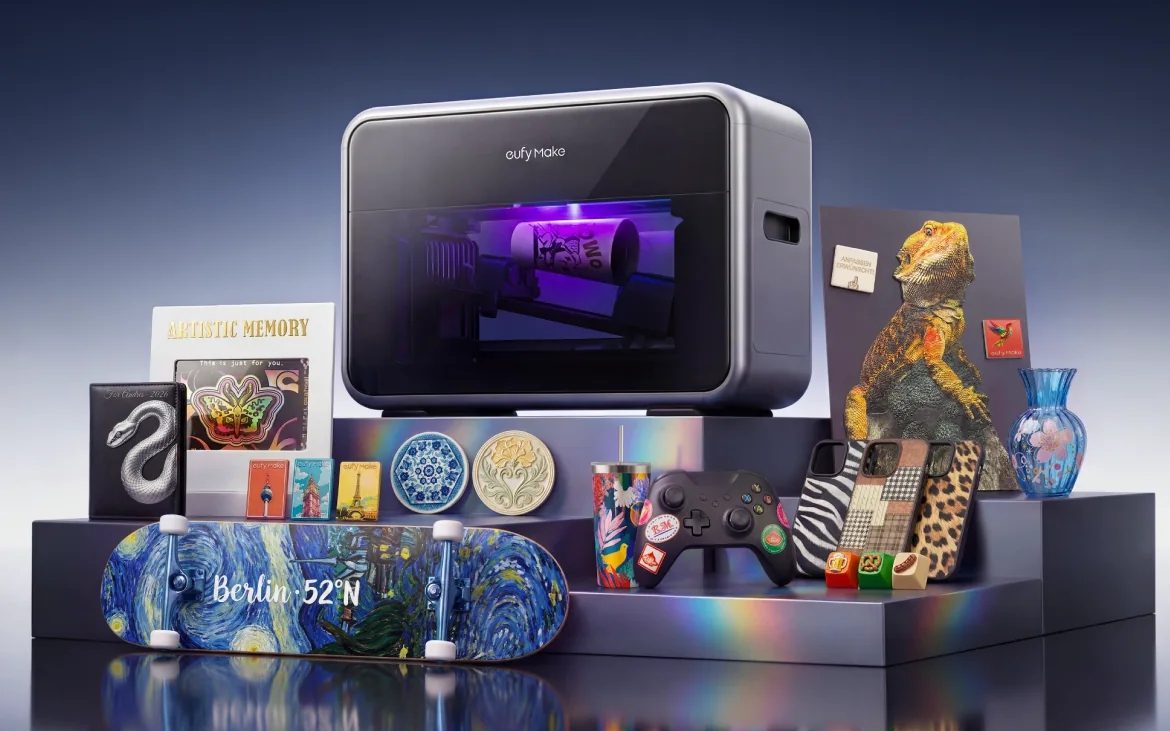
3D printing adds volume to your creations, laser engraving personalizes them in relief, but a part often remains limited by its flat color or requires lengthy post-processing: sanding, painting, varnishing. That's precisely where Anker, through its specialized brand eufyMake, launched the eufyMake E1, billed as the first "3D texture" UV printer designed for hobbyists and small workshops.
Until now, flat UV printers (UV flatbed) were mostly reserved for printing professionals, with bulky and expensive machines. The E1 made waves in 2025: its Kickstarter campaign raised nearly 47 million dollars, an all-time record for the platform. It's been available for regular purchase in Europe since July 2025.
1. How UV printing works
Unlike a standard inkjet printer, whose liquid ink is absorbed by paper, a UV printer sprays micro-droplets of photosensitive ink, instantly cured by an LED UV lamp mounted on the print head. The ink doesn't soak into the surface—it hardens on top in a fraction of a second. Three workshop advantages:
- Almost any substrate: wood, metal, glass, acrylic, leather, ceramic, phone cases… and of course your 3D printed parts (PLA, PETG, ABS, resin).
- White and varnish: the machine applies a white undercoat (essential for vibrant colors on dark or transparent surfaces), then colors (cyan, magenta, yellow, black), and finally a gloss varnish if needed.
- Relief and texture: by layering multiple passes in the same spot, the printer creates real textures you can feel: leather grain, brush strokes, water droplets, or braille lettering. eufyMake claims up to 5 mm of relief.
2. Key features of the eufyMake E1
Designed like the "ready-to-use" 3D printers and laser engravers of recent years, the E1 focuses on automation:
- Desktop format: roughly 59 × 25 × 41 cm and 20 kg, with a 33 × 42 cm build plate, UV-blocking lid, and included air filter.
- Automatic positioning: two lasers and a camera measure object height and photograph the bed to precisely place your image. The head adapts to slight height differences, on the order of a few millimeters.
- Optional rotary module: like on a laser engraver, it lets you print all around cylindrical objects: water bottles, mugs, tumblers.
- Automatic maintenance: the weak point of UV heads is nozzle clogging from ink drying. The E1 includes a cleaning cartridge and automatic maintenance cycles.
- AI-assisted software: eufyMake Studio removes backgrounds, generates relief maps to create textures, and helps position your image. Note: some AI functions consume paid credits.
3. What it means for 3D printing enthusiasts
For a maker already equipped with a 3D printer, a UV printer opens new finishing possibilities:
- Less hand painting: print a part in white or gray PLA, then add highly detailed logos, gradations, or realistic textures directly to it. An alternative to brushwork and our 3D print painting techniques, without replacing multicolor 3D printing for parts with color throughout.
- Custom faceplates and enclosures: front panels for Arduino or Raspberry Pi projects, with buttons, icons, and reference marks perfectly sharp.
- Personalization and small runs: ideal for those selling their creations (keychains, plaques, trophies, décor items), with professional output, touch-dry straight from the machine. Perfect to expand your 3D printing shop.
4. How much does the eufyMake E1 cost?
- Retail price: €2,499 in Europe at launch, with regular promotions (€500 discount at release). Prices evolve—check current pricing.
- Inks: proprietary 100 ml cartridges at roughly €40 each, or in kits (colors, white, varnish, and cleaning) around €300. White and varnish deplete much faster than colors.
- Cost per object: from a few cents of ink for a small logo to dozens of euros for a large heavily textured print.
It's a far bigger investment than a consumer 3D printer, but significantly more accessible than professional UV printers, making it compelling for passionate makers and micro-businesses in personalization.
5. Important considerations
- Consumable costs: proprietary inks (especially white and varnish) and maintenance fluids represent a much larger budget than filament.
- Regular use required: the head and tubes must not dry out. The machine needs to run regularly or stay plugged in for maintenance mode—a UV printer doesn't like sitting idle for weeks, risking print head damage.
- Odor: despite the included filter, UV inks give off a strong smell. Plan for a well-ventilated room, not a bedroom or living area.
- Speed: a large heavily textured print can take several hours. Great for personalization, less ideal for high-volume production.
To learn more about the machine and its accessories, visit the brand's official website.


